用 git worktree 并行运行 claude code 会话
说实话,虽然很久之前见过 Git worktree 这个功能,但是在实战中从来没见过,恰好师兄那天在研究这个工具,我就搜了一下,发现 Claude 官方已经有了 document 随即打算对这个做一个简单的翻译和使用说明。
蹭个热度的话,Git 不愧是 Linus 的发明,在并行工作这一块。

Git worktrees allow you to check out multiple branches from the same repository into separate directories. Each worktree has its own working directory with isolated files, while sharing the same Git history. Learn more in the official Git worktree documentation.
如果我们用 Branch 去处理类似的工作的话,没有提交的代码会影响我们的进度,我们必须把他提交之后我们才可以安全的切换分支,对于 Git worktrees 就不会有这个问题。
相当于对于在两台机器上,我们直接用 Branch 进行干活是没有任何问题的,但是我们很有可能需要在一台机器上同时分发任务,这时候即使我开多个终端,也没办法跑多个分支,但是我们可以跑多个 Worktree。
当然,看 Git Worktrees 的官方文档是最方便的,但是这里暂且不表。只需要知道针对的场景是一个人一个机器多个终端的环境就好了。
# Create a new worktree with a new branchgit worktree add ../project-feature-a -b feature-a
# Or create a worktree with an existing branchgit worktree add ../project-bugfix bugfix-123
This creates a new directory with a separate working copy of your repository.
创建好我们的 Worktree 之后
# Navigate to your worktreecd ../project-feature-a
# Run Claude Code in this isolated environmentclaude
打开我们创建的这个工作区,就可以直接把工作交给 LLM 去书写代码。
完成后
# List all worktreesgit worktree list
# Remove a worktree when donegit worktree remove ../project-feature-a
直接删除就好。
这样子的好处在于不用手动 clone 多个,巨量减轻了心智负担。
Claude 还给我们提供了一系列的 tips,我觉得我平常用的工作流会更加类似
For long-running tasks, you can have Claude working in one worktree while you continue development in another
来方便 vibe coding 配合我自己进行一些手动修改。
一般情况下我依赖于 oh-my-zsh 配置的一些 Git 命令表,不过经过推荐知道了一个很好用的工具
你可以直接用这个来管理对应的 worktree 来方便工作。
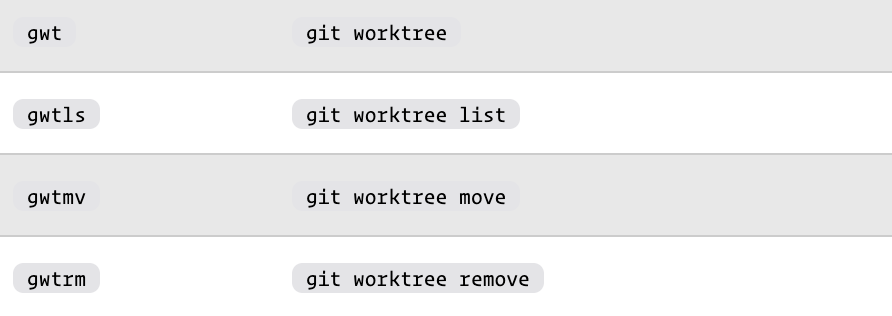
oh-my-zsh 配置的 git 插件的别名如上。